Create APA™ Format Document Using Microsoft Word Part 3
On the first line of page 3, type your essay title and center it.
Set the text on the second line to left-aligned, then press Tab on your keyboard to indent the first paragraph. Begin writing your essay.
When you have finished, click on 'Insert' 'Page' 'Page Break' or use the shortcut Command (⌘) + Enter on Mac, or Ctrl + Enter on Windows to create page 4.
On the first line of page 4, type 'References' and center it.
-
Set the text on the second line to left-align and paste your references. Make sure to italicize the titles of your sources and arrange the reference list in alphabetical order. Left-align the first line of each reference, and if a reference spans two or more lines, indent the additional lines. Refer to the screenshot for an example.

A screenshot providing an example of the References page. -
The final step for our APA™ format document is to add a header. Scroll to the top of page 1 and double-click anywhere at the top of the page to open the header. If that does not work, click on 'View' 'Header and Footer.'
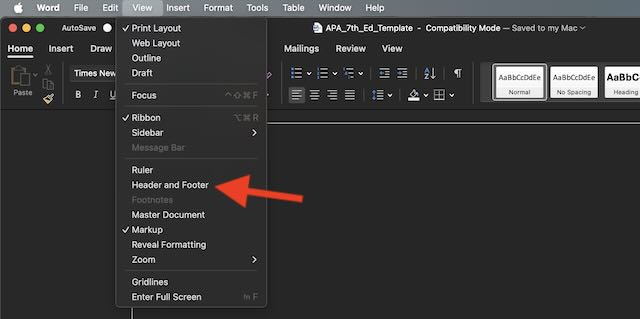
A screenshot showing where the 'Header and Footer' option is located in the menu dropdown. -
To insert the page number, click on the 'Page Number' button located in the top-left corner of the screen. This will display a popup menu; select 'Top of Page' 'Plain Number 1.'
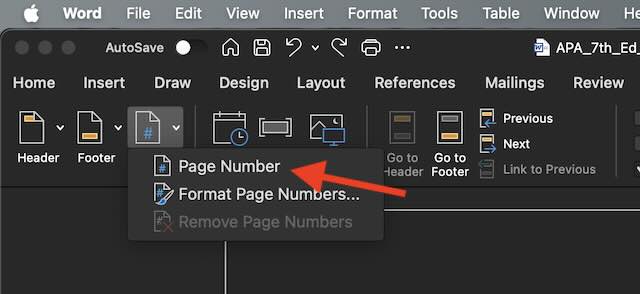
A screenshot showing where the 'Page Number' item is located. Type 'Running head:' followed by the title of your essay in all capital letters.
-
To move the number to the right side, press Tab twice.

A screenshot of the document's header. -
Scroll down until you reach the header for page 2. Insert the page number using the same method described in step 19. Type your essay title in all capital letters, then press Tab twice to align the page number to the right.

A screenshot of the document's header. Exit header mode by double-clicking the body of the page. The APA™ format document is now complete! If you have an abstract page, return to page 3; otherwise, go back to page 2 to continue writing your essay.
American Psychological Association (APA), are registered trademarks of the American Psychological Association.